


はじめに
アプリケーションサービス本部ディベロップメントサービス1課の森山です。
普段からAWSのアップデートのうち、気になるものを動作検証してたりするので、今回こちらのブログでも投稿したいと思います。
早速ですが、2025年10月にAWS Application Load Balancer (ALB) に URL と ホストヘッダー の書き換え機能が追加されました。
フロントエンド等の対向システムを変更することなく、API のバージョンアップが ELB だけでできるようになったりと、知っておくと便利そうだったので、試してみたいと思います。
新機能で何ができるようになったか
今回追加された機能は大きく分けて 2 つあります。
1. Regex Matching(正規表現マッチング)
リスナールールの条件(Conditions)で正規表現が使えるようになりました。
例えば、/api/users, /api/orders, /api/products に対して、それぞれリスナールールを設定する場合、個別の設定が必要でしたが、一つのリスナールールで対応できるようになりました。
2. Transforms(リクエスト変換)
リクエストをバックエンドに転送する前に、ALB で変換できるようになりました。
/api/usersを/v2/users のようにパスを変換し、バックエンドへ渡すことができます。
また、hostヘッダーに限定されますが、ヘッダー値を api.example.com からapi.v2.example.com のように 変換することが可能です。
今まではこれらを実現するために、Lambda@Edge、Nginx などを使う必要がありましたが、ALB単体で実現できるようになりました。
またこれらの機能は追加料金なしで利用可能です。
試してみた
早速、動作確認してみます。
今回は、一つのリスナールールで、/api/usersや、/api/transactionsといったリクエストを、/v2/users,/v2/transactionsといった感じにリライトし、バージョンアップ後のリクエストに変換します。
また、host ヘッダのドメインもapi.example.comから、api.v2.example.comへ書き換えます。
Step 1: 環境構築
動作確認環境は、ALB に1台の EC2 を紐付け、リクエストされた情報をそのまま返却する環境で動作確認してみます。
作成は cdk で簡単に記載してみました。
クリックでコード表示
import * as cdk from "aws-cdk-lib";
import * as ec2 from "aws-cdk-lib/aws-ec2";
import * as iam from "aws-cdk-lib/aws-iam";
import * as elbv2 from "aws-cdk-lib/aws-elasticloadbalancingv2";
import * as targets from "aws-cdk-lib/aws-elasticloadbalancingv2-targets";
import { Construct } from "constructs";

export class ALBRewriteStack extends cdk.Stack {
  constructor(scope: Construct, id: string, props?: cdk.StackProps) {
    super(scope, id, props);

    // VPC
    const vpc = new ec2.Vpc(this, "VPC", {
      maxAzs: 2,
      natGateways: 1,
    });

    // ALB
    const albSecurityGroup = new ec2.SecurityGroup(this, "ALBSG", {
      vpc,
      description: "Security group for ALB",
      allowAllOutbound: true,
    });
    albSecurityGroup.addIngressRule(
      ec2.Peer.anyIpv4(),
      ec2.Port.tcp(80),
      "Allow HTTP from Internet"
    );
    albSecurityGroup.addEgressRule(
      ec2.Peer.anyIpv4(),
      ec2.Port.allTraffic(),
      "Allow all outbound traffic"
    );

    const alb = new elbv2.ApplicationLoadBalancer(this, "ALB", {
      vpc,
      internetFacing: true,
      securityGroup: albSecurityGroup,
    });

    const listener = alb.addListener("Listener", {
      port: 80,
    });

    // EC2
    const legacySecurityGroup = new ec2.SecurityGroup(this, "LegacySG", {
      vpc,
      description: "Security group for legacy EC2",
      allowAllOutbound: true,
    });
    legacySecurityGroup.addIngressRule(
      ec2.Peer.securityGroupId(albSecurityGroup.securityGroupId),
      ec2.Port.tcp(80),
      "Allow HTTP from ALB only"
    );

    const legacyInstance = new ec2.Instance(this, "LegacyInstance", {
      vpc,
      vpcSubnets: {
        subnetType: ec2.SubnetType.PRIVATE_WITH_EGRESS,
      },
      instanceType: ec2.InstanceType.of(
        ec2.InstanceClass.T3,
        ec2.InstanceSize.MICRO
      ),
      machineImage: ec2.MachineImage.latestAmazonLinux2023(),
      securityGroup: legacySecurityGroup,
      userData: ec2.UserData.forLinux(),
    });

    // Node.jsでWebサーバを作成
    legacyInstance.addUserData(
      "yum update -y",
      "yum install -y nodejs",
      "cat > /home/ec2-user/server.js << 'EOF'",
      "const http = require('http');",
      "const server = http.createServer((req, res) => {",
      "  res.writeHead(200, { 'Content-Type': 'application/json' });",
      "  res.end(JSON.stringify({",
      "    host: req.headers.host,",
      "    path: req.url",
      "  }));",
      "});",
      "server.listen(80, () => console.log('Server running on port 80'));",
      "EOF",
      "node /home/ec2-user/server.js &"
    );

    // ターゲットグループ
    const legacyTarget = new elbv2.ApplicationTargetGroup(this, "Legacy", {
      vpc,
      port: 80,
      protocol: elbv2.ApplicationProtocol.HTTP,
      targets: [new targets.InstanceTarget(legacyInstance)],
      healthCheck: {
        path: "/",
        interval: cdk.Duration.seconds(30),
      },
    });

    listener.addAction("DefaultAction", {
      action: elbv2.ListenerAction.forward([legacyTarget]),
    });

    new cdk.CfnOutput(this, "ALBUrl", {
      value: `http://${alb.loadBalancerDnsName}`,
      description: "ALB URL",
    });
  }
}
デプロイ後、まずはリライトの設定を入れず、動作確認してみます。
curl -H "Host: api.example.com" \
  http://xxxxxxxxxx.ap-northeast-1.elb.amazonaws.com/api/users

# レスポンス
{"host":"api.example.com","path":"/api/users"}
リクエストの内容がそのまま表示されていることが確認できますね。
Step 2: URL リライトルールを追加する(マネジメントコンソール)
では、マネジメントコンソールからリスナールールを追加してみます。
なお、詳細な設定方法は割愛し、新機能に関する部分のみ記載させていただきます。
条件
まず、条件の設定ですが、正規表現でのマッチングができるようになりました。
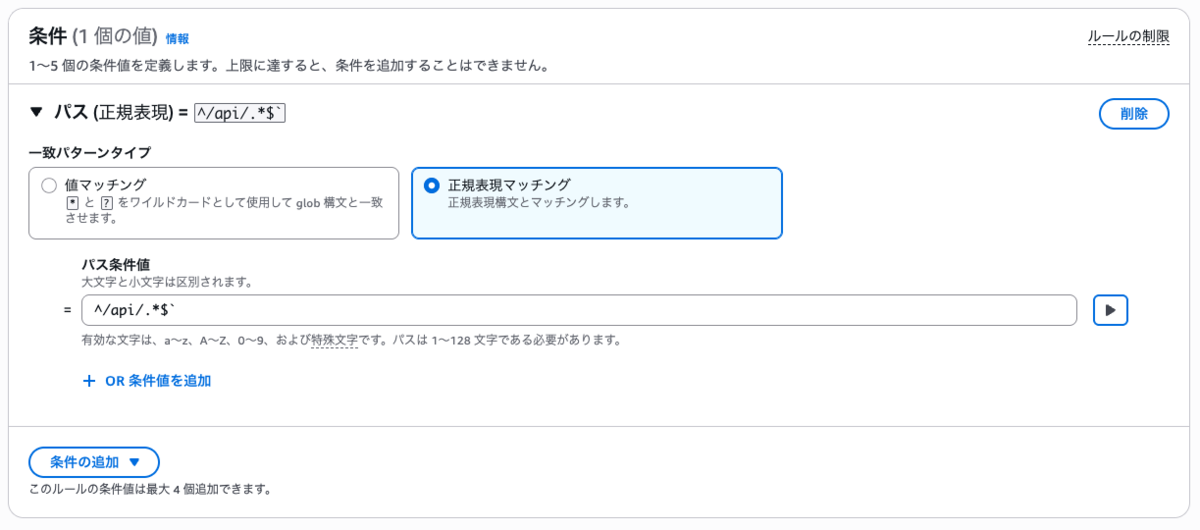
今回は/api/usersのような /api起点のものをマッチングするようにしますので、^/api/.*$を設定します。
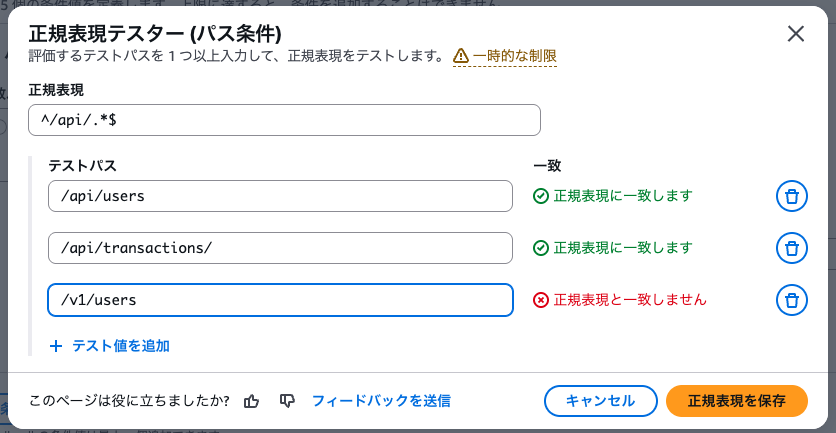
なお、▶︎ を選択することで、正規表現の動作確認が可能です。
URLリライト
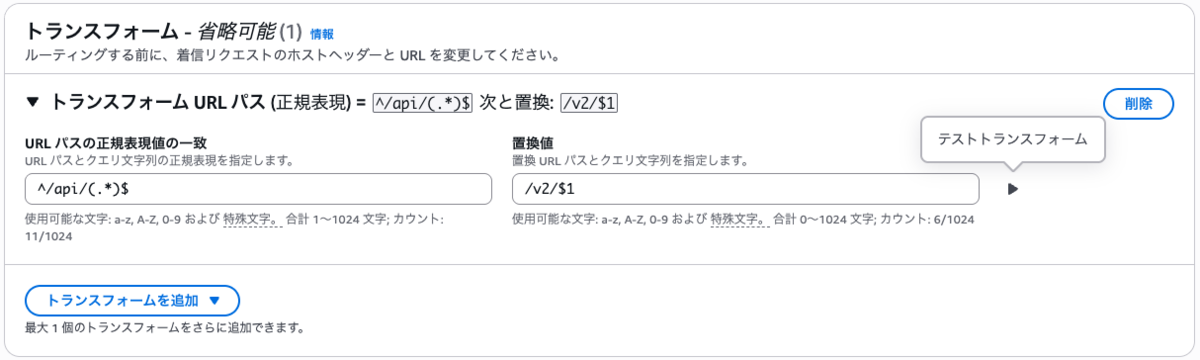
次に URL のリライト機能を設定します。
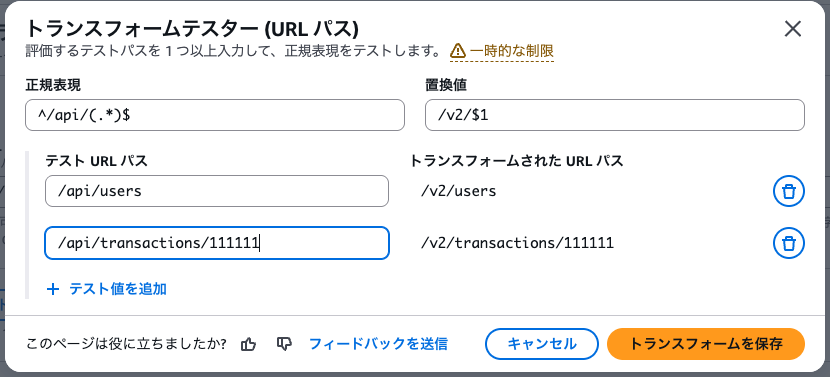
^/api/(.*)$を/v2/$1のように変換してみました。
こちらも同様に正規表現のテストが可能です。
hostヘッダーリライト
最後にhostヘッダーの設定をします。
ここも正規表現が利用できますので、(.+).example.comを$1.v2.example.comのように変換しました。

テストも同様です。

これで完成です!最終的なリスナールールは以下の通りです。

Step 3: 動作確認
ひととおり設定が完了したので、動作確認してみます。
/api/usersパターン
% curl -H "Host: api.example.com" \
  http://xxxxxxxxxx.ap-northeast-1.elb.amazonaws.com/api/users

# レスポンス
{"host":"api.v2.example.com","path":"/v2/users"}
/api/transactions/1234567パターン
% curl -H "Host: api.example.com" \
  http://xxxxxxxxxx.ap-northeast-1.elb.amazonaws.com/api/transactions/1234567

# レスポンス
{"host":"api.v2.example.com","path":"/v2/transactions/1234567"}
想定どおりに動いていますね!
また、aws elbv2 describe-rulesで設定を確認しても正しく反映されていました。
クリックで結果表示
aws elbv2 describe-rules --profile work --region ap-northeast-1 --rule-arns "arn:aws:elasticloadbalancing:ap-northeast-1:111122223333:listener-rule/app/ALBRew-ALBAE-CHjqtSlXNtBk/73589e0d286bb083/6d7325033df829be/8d6a7dfec322df39" --output json

{
    "Rules": [
        {
            "RuleArn": "arn:aws:elasticloadbalancing:ap-northeast-1:111122223333:listener-rule/app/ALBRew-ALBAE-CHjqtSlXNtBk/73589e0d286bb083/6d7325033df829be/8d6a7dfec322df39",
            "Priority": "1",
            "Conditions": [
                {
                    "Field": "path-pattern",
                    "PathPatternConfig": {
                        "RegexValues": [
                            "^/api/.*$"
                        ]
                    },
                    "RegexValues": [
                        "^/api/.*$"
                    ]
                }
            ],
            "Actions": [
                {
                    "Type": "forward",
                    "TargetGroupArn": "arn:aws:elasticloadbalancing:ap-northeast-1:111122223333:targetgroup/ALBRew-Legac-4GAJTCA12SPI/4193f7bc0251a67c",
                    "Order": 1,
                    "ForwardConfig": {
                        "TargetGroups": [
                            {
                                "TargetGroupArn": "arn:aws:elasticloadbalancing:ap-northeast-1:111122223333:targetgroup/ALBRew-Legac-4GAJTCA12SPI/4193f7bc0251a67c",
                                "Weight": 1
                            }
                        ],
                        "TargetGroupStickinessConfig": {
                            "Enabled": false,
                            "DurationSeconds": 3600
                        }
                    }
                }
            ],
            "IsDefault": false,
            "Transforms": [
                {
                    "Type": "host-header-rewrite",
                    "HostHeaderRewriteConfig": {
                        "Rewrites": [
                            {
                                "Regex": "(.+).example.com",
                                "Replace": "$1.v2.example.com"
                            }
                        ]
                    }
                },
                {
                    "Type": "url-rewrite",
                    "UrlRewriteConfig": {
                        "Rewrites": [
                            {
                                "Regex": "^/api/(.*)$",
                                "Replace": "/v2/$1"
                            }
                        ]
                    }
                }
            ]
        }
    ]
}
なお、AWS CLI のバージョンが古いと設定情報が取得できなかったため、最新版へバージョンアップが必要です。
CDKを使った設定方法
最後にCDKでの設定についても確認してみました。
L1 コンストラクトではありますが、CDK で対応する場合は以下のような感じで対応できました。
クリックでコード表示
    new elbv2.CfnListenerRule(this, "RewriteRule", {
      listenerArn: listener.listenerArn,
      priority: 1,
      conditions: [
        {
          field: "path-pattern",
          pathPatternConfig: {
            regexValues: ["^/api/.*$"],
          },
        },
      ],
      actions: [
        {
          type: "forward",
          targetGroupArn: legacyTarget.targetGroupArn,
          order: 1,
        },
      ],
      transforms: [
        {
          type: "host-header-rewrite",
          hostHeaderRewriteConfig: {
            rewrites: [
              {
                regex: "(.+).example.com",
                replace: "$1.v2.example.com",
              },
            ],
          },
        },
        {
          type: "url-rewrite",
          urlRewriteConfig: {
            rewrites: [
              {
                regex: "^/api/(.*)$",
                replace: "/v2/$1",
              },
            ],
          },
        },
      ],
    });
まとめ
今回のアップデートで正規表現を使った柔軟なルール作成や、URL、ホストヘッダーの書き換えができることを検証できました。
システムの段階的移行パターン(ストラングラーフィグパターン)等のバージョンアップ時の手法の一つとして活用できそうですので、ご紹介しました。
誰かのお役に立てれば幸いです。
