


こんにちは😸
カスタマーサクセス部の山本です。
AWS Price List Query API を使用して EC2 のオンデマンドインスタンスの料金を取得する
以下のインスタンスの時間あたりの料金を調べたいと思います。
- Amazon Linux 2023
- t3.xlarge
- オンデマンド
- 東京リージョン
WEB ブラウザですと、以下の URL から確認していただくことが可能です。
オンデマンドインスタンスの料金 - Amazon EC2 (仮想サーバー) | AWS

AWS CLI や SDK を使用して取得することも可能です。
例えばインスタンスの稼働時間を describe-instances API で取得して、そこに料金を乗算することにより、そのインスタンスの起動日時から現在までの料金がわかると思います。
本記事では AWS CLI を使用して、オンデマンドインスタンスの料金を取得する方法を解説します。
AWS CLI
事前準備:filters.json を用意
例えば同じ t3.xlarge のインスタンスタイプでも、以下のパターンがあります。
- Linux のオンデマンドでの料金
- Linux のリザーブドインスタンスで前払いした場合の料金
- Linux のリザーブドインスタンスで前払いなしの場合の料金
- Linux の 4 年リザーブ...
- 共有ホスト/占有ホスト
- 利用リージョン
- Windows のオンデマンド ....etc
ある程度の絞り込みを行う必要があり、事前準備としてフィルターを作成します。
[
  {
    "Type": "TERM_MATCH",
    "Field": "regionCode",
    "Value": "ap-northeast-1"
  },
  {
    "Type": "TERM_MATCH",
    "Field": "operatingSystem",
    "Value": "Linux"
  },
  {
    "Type": "TERM_MATCH",
    "Field": "tenancy",
    "Value": "Shared"
  },
  {
    "Type": "TERM_MATCH",
    "Field": "instanceType",
    "Value": "t3.xlarge"
  },
  {
    "Type": "TERM_MATCH",
    "Field": "preInstalledSw",
    "Value": "NA"
  },
  {
    "Type": "TERM_MATCH",
    "Field": "marketoption",
    "Value": "OnDemand"
  },
  {
    "Type": "TERM_MATCH",
    "Field": "capacitystatus",
    "Value": "UnusedCapacityReservation"
  }
]
filters.json の説明
以下のようなフィルターにしてみました。
1. リージョンコード
regionCode: "ap-northeast-1"- AWS東京リージョン(アジアパシフィック-東京)
2. オペレーティングシステム
operatingSystem: "Linux"- もしWindows にしたい場合は
Windows
- もしWindows にしたい場合は
3. テナンシー
tenancy: "Shared"- 共有ハードウェア上で稼働
4. インスタンスタイプ
instanceType: "t3.xlarge"- 必要に応じて変更する
5. 事前インストールソフトウェア
preInstalledSw: "NA"- 追加ソフトウェアなし
- クリーンな基本OSイメージ
6. マーケットオプション
marketoption: "OnDemand"- 従量課金モデル
- リザーブドインスタンスではない
7. キャパシティステータス
capacitystatus: "UnusedCapacityReservation"- キャパシティ予約なし
フィルターに関する補足
フィルターに指定可能な属性は、以下のコマンドで取得できます。
サービス一覧を取得
aws pricing describe-services --region us-east-1
EC2 の属性一覧を取得
aws pricing describe-services --region us-east-1 --service-code AmazonEC2
EC2 の属性 operatingSystem に指定可能な値の一覧を取得
aws pricing get-attribute-values --service-code AmazonEC2 --attribute-name operatingSystem --region us-east-1


試してみる
参考:get-products
コマンド:aws pricing get-products --service-code AmazonEC2 --region us-east-1 --filters file://filters.json
aws pricing get-products- AWS料金情報を取得するCLIコマンド
- 製品の詳細な価格情報を検索
--service-code AmazonEC2- EC2サービスの価格情報に絞り込み
--region us-east-1- 米国東部(バージニア北部)リージョンまたはいくつかの pricing API に対応しているリージョンを指定する必要がある。
--filters file://filters.json- 外部JSONファイルから検索フィルターを読み込み
- 詳細な検索条件を柔軟に設定可能
以下、出力です。
{
    "PriceList": [
        "{\"product\":{\"productFamily\":\"Compute Instance\",\"attributes\":{\"enhancedNetworkingSupported\":\"No\",\"intelTurboAvailable\":\"Yes\",\"memory\":\"16 GiB\",\"dedicatedEbsThroughput\":\"Up to 2780 Mbps\",\"vcpu\":\"4\",\"classicnetworkingsupport\":\"false\",\"capacitystatus\":\"UnusedCapacityReservation\",\"locationType\":\"AWS Region\",\"storage\":\"EBS only\",\"instanceFamily\":\"General purpose\",\"operatingSystem\":\"Linux\",\"intelAvx2Available\":\"Yes\",\"regionCode\":\"ap-northeast-1\",\"physicalProcessor\":\"Intel Skylake E5 2686 v5\",\"clockSpeed\":\"3.1 GHz\",\"ecu\":\"NA\",\"networkPerformance\":\"Up to 5 Gigabit\",\"servicename\":\"Amazon Elastic Compute Cloud\",\"instancesku\":\"8VN3HX7E6Z8JVZ78\",\"gpuMemory\":\"NA\",\"vpcnetworkingsupport\":\"true\",\"instanceType\":\"t3.xlarge\",\"tenancy\":\"Shared\",\"usagetype\":\"APN1-UnusedBox:t3.xlarge\",\"normalizationSizeFactor\":\"8\",\"intelAvxAvailable\":\"Yes\",\"processorFeatures\":\"AVX; AVX2; Intel AVX; Intel AVX2; Intel AVX512; Intel Turbo\",\"servicecode\":\"AmazonEC2\",\"licenseModel\":\"No License required\",\"currentGeneration\":\"Yes\",\"preInstalledSw\":\"NA\",\"location\":\"Asia Pacific (Tokyo)\",\"processorArchitecture\":\"64-bit\",\"marketoption\":\"OnDemand\",\"operation\":\"RunInstances\",\"availabilityzone\":\"NA\"},\"sku\":\"93BUYPJN62TXY9XZ\"},\"serviceCode\":\"AmazonEC2\",\"terms\":{\"OnDemand\":{\"93BUYPJN62TXY9XZ.JRTCKXETXF\":{\"priceDimensions\":{\"93BUYPJN62TXY9XZ.JRTCKXETXF.6YS6EN2CT7\":{\"unit\":\"Hrs\",\"endRange\":\"Inf\",\"description\":\"$0.2176 per Unused Reservation Linux t3.xlarge Instance Hour\",\"appliesTo\":[],\"rateCode\":\"93BUYPJN62TXY9XZ.JRTCKXETXF.6YS6EN2CT7\",\"beginRange\":\"0\",\"pricePerUnit\":{\"USD\":\"0.2176000000\"}}},\"sku\":\"93BUYPJN62TXY9XZ\",\"effectiveDate\":\"2025-05-01T00:00:00Z\",\"offerTermCode\":\"JRTCKXETXF\",\"termAttributes\":{}}}},\"version\":\"20250523232744\",\"publicationDate\":\"2025-05-23T23:27:44Z\"}"
    ],
    "FormatVersion": "aws_v1"
}
jq コマンドを用いて、ほしい情報のみ抽出した json にする。
以下のように実行してみます。
aws pricing get-products \
  --service-code AmazonEC2 \
  --region us-east-1 \
  --filters file://filters.json \
  |jq -r '.PriceList[]' \
  |jq '{
      operatingSystem: .product.attributes.operatingSystem,
      instanceType: .product.attributes.instanceType,
      vcpu: .product.attributes.vcpu,
      memory: .product.attributes.memory,
      price: .terms.OnDemand[].priceDimensions[].pricePerUnit.USD
  }'
jqコマンド詳細
|jq -r '.PriceList[]'- 価格リストの全エントリを展開
- 生のJSONデータを処理可能な形式に変換
最後のjqフィルター
- 以下の情報を抽出:
- オペレーティングシステム
- インスタンスタイプ
- vCPU数
- メモリ容量
- 従量課金(OnDemand)価格
- 以下の情報を抽出:
実行結果
{
  "operatingSystem": "Linux",
  "instanceType": "t3.xlarge",
  "vcpu": "4",
  "memory": "16 GiB",
  "price": "0.2176000000"
}
取得できました。
Lambda (Python3 + Boto3)
AWS CLI と同様に情報取得できます。
Lambda は東京リージョンに作成しました。
以下の部分で Price API を実行するリージョンをバージニア北部に指定しています。
pricing_client = boto3.client('pricing', region_name='us-east-1')
import json
import boto3

pricing_client = boto3.client('pricing', region_name='us-east-1')

def lambda_handler(event, context):
    instance_id = event.get('InstanceId')
    instance_type = event.get('InstanceType')

    if not instance_type:
        raise ValueError("Error: InstanceType is not provided in the input event.")

    filters = [
        {'Type': 'TERM_MATCH', 'Field': 'regionCode', 'Value': 'ap-northeast-1'},
        {'Type': 'TERM_MATCH', 'Field': 'instanceType', 'Value': instance_type},
        {'Type': 'TERM_MATCH', 'Field': 'operatingSystem', 'Value': 'Linux'},
        {'Type': 'TERM_MATCH', 'Field': 'tenancy', 'Value': 'Shared'},
        {'Type': 'TERM_MATCH', 'Field': 'preInstalledSw', 'Value': 'NA'},
        {'Type': 'TERM_MATCH', 'Field': 'capacitystatus', 'Value': 'UnusedCapacityReservation'},
        {'Type': 'TERM_MATCH', 'Field': 'marketoption', 'Value': 'OnDemand'}
    ]

    try:
        response = pricing_client.get_products(
            ServiceCode='AmazonEC2',
            Filters=filters
        )

        price = "Not Found"
        if response.get('PriceList'):
            price_data = json.loads(response['PriceList'][0])
            on_demand_terms = price_data.get('terms', {}).get('OnDemand', {})

            if on_demand_terms:
                first_term_key = list(on_demand_terms.keys())[0]
                price_dimensions = on_demand_terms[first_term_key].get('priceDimensions', {})

                first_dimension_key = list(price_dimensions.keys())[0]
                price_per_unit = price_dimensions[first_dimension_key].get('pricePerUnit', {})

                price = price_per_unit.get('USD', 'Not Found')

        return {
            'InstanceId': instance_id,
            'InstanceType': instance_type,
            'OnDemandPriceUSD': price,
            'Currency': 'USD',
            'Error': None
        }

    except Exception as e:
        print(f"Error fetching pricing for {instance_type}: {e}")
        return {
            'InstanceId': instance_id,
            'InstanceType': instance_type,
            'OnDemandPriceUSD': None,
            'Currency': None,
            'Error': str(e)
        }
取得できました。

補足:以下のような event を受け取って動作するようにしています。
{
  "InstanceId": "i-hogehoge",
  "InstanceType": "t3.xlarge"
}
Step Functions
GetProducts API があります。

以下のような定義にしました。
{
  "Comment": "A description of my state machine",
  "StartAt": "GetProducts",
  "States": {
    "GetProducts": {
      "Type": "Task",
      "Arguments": {
        "ServiceCode": "AmazonEC2",
        "Filters": [
          {
            "Type": "TERM_MATCH",
            "Field": "regionCode",
            "Value": "ap-northeast-1"
          },
          {
            "Type": "TERM_MATCH",
            "Field": "instanceType",
            "Value": "t3.xlarge"
          },
          {
            "Type": "TERM_MATCH",
            "Field": "operatingSystem",
            "Value": "Linux"
          },
          {
            "Type": "TERM_MATCH",
            "Field": "tenancy",
            "Value": "Shared"
          },
          {
            "Type": "TERM_MATCH",
            "Field": "preInstalledSw",
            "Value": "NA"
          },
          {
            "Type": "TERM_MATCH",
            "Field": "capacitystatus",
            "Value": "UnusedCapacityReservation"
          },
          {
            "Type": "TERM_MATCH",
            "Field": "marketoption",
            "Value": "OnDemand"
          }
        ]
      },
      "Resource": "arn:aws:states:::aws-sdk:pricing:getProducts",
      "End": true
    }
  },
  "QueryLanguage": "JSONata"
}
バージニア北部リージョンで実行(成功)
バージニア北部リージョン (us-east-1) で実行してみました。

{
  "FormatVersion": "aws_v1",
  "PriceList": [
    "{\"product\":{\"productFamily\":\"Compute Instance\",\"attributes\":{\"enhancedNetworkingSupported\":\"No\",\"intelTurboAvailable\":\"Yes\",\"memory\":\"16 GiB\",\"dedicatedEbsThroughput\":\"Up to 2780 Mbps\",\"vcpu\":\"4\",\"classicnetworkingsupport\":\"false\",\"capacitystatus\":\"UnusedCapacityReservation\",\"locationType\":\"AWS Region\",\"storage\":\"EBS only\",\"instanceFamily\":\"General purpose\",\"operatingSystem\":\"Linux\",\"intelAvx2Available\":\"Yes\",\"regionCode\":\"ap-northeast-1\",\"physicalProcessor\":\"Intel Skylake E5 2686 v5\",\"clockSpeed\":\"3.1 GHz\",\"ecu\":\"NA\",\"networkPerformance\":\"Up to 5 Gigabit\",\"servicename\":\"Amazon Elastic Compute Cloud\",\"instancesku\":\"8VN3HX7E6Z8JVZ78\",\"gpuMemory\":\"NA\",\"vpcnetworkingsupport\":\"true\",\"instanceType\":\"t3.xlarge\",\"tenancy\":\"Shared\",\"usagetype\":\"APN1-UnusedBox:t3.xlarge\",\"normalizationSizeFactor\":\"8\",\"intelAvxAvailable\":\"Yes\",\"processorFeatures\":\"AVX; AVX2; Intel AVX; Intel AVX2; Intel AVX512; Intel Turbo\",\"servicecode\":\"AmazonEC2\",\"licenseModel\":\"No License required\",\"currentGeneration\":\"Yes\",\"preInstalledSw\":\"NA\",\"location\":\"Asia Pacific (Tokyo)\",\"processorArchitecture\":\"64-bit\",\"marketoption\":\"OnDemand\",\"operation\":\"RunInstances\",\"availabilityzone\":\"NA\"},\"sku\":\"93BUYPJN62TXY9XZ\"},\"serviceCode\":\"AmazonEC2\",\"terms\":{\"OnDemand\":{\"93BUYPJN62TXY9XZ.JRTCKXETXF\":{\"priceDimensions\":{\"93BUYPJN62TXY9XZ.JRTCKXETXF.6YS6EN2CT7\":{\"unit\":\"Hrs\",\"endRange\":\"Inf\",\"description\":\"$0.2176 per Unused Reservation Linux t3.xlarge Instance Hour\",\"appliesTo\":[],\"rateCode\":\"93BUYPJN62TXY9XZ.JRTCKXETXF.6YS6EN2CT7\",\"beginRange\":\"0\",\"pricePerUnit\":{\"USD\":\"0.2176000000\"}}},\"sku\":\"93BUYPJN62TXY9XZ\",\"effectiveDate\":\"2025-08-01T00:00:00Z\",\"offerTermCode\":\"JRTCKXETXF\",\"termAttributes\":{}}}},\"version\":\"20250807222053\",\"publicationDate\":\"2025-08-07T22:20:53Z\"}"
  ]
}
料金を取得できていました。

東京リージョンで実行(失敗)
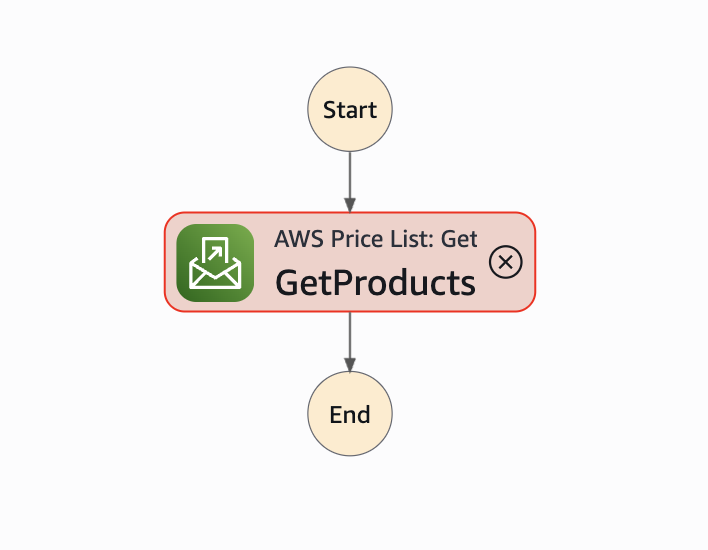
- 米国東部(バージニア北部)リージョンまたはいくつかの pricing API に対応しているリージョンを指定する必要があるため失敗する。
エラーメッセージは以下のようなものがでます。エンドポイント名を解決できないようです。
Received an UnknownHostException when attempting to interact with a service. See cause for the exact endpoint that is failing to resolve. If this is happening on an endpoint that previously worked, there may be a network connectivity issue or your DNS cache could be storing endpoints for too long.
まとめ
本記事では、AWS Price List Query API を利用して、EC2のオンデマンドインスタンス料金をプログラムで取得する方法を解説しました。具体的な手法として、AWS CLI、Lambda (Python)、そして Step Functions の3つのパターンを紹介しました。
どの方法を利用する場合でも、最も重要な注意点は、料金情報を問い合わせるAPIエンドポイントが特定のリージョン(例: us-east-1)にしか存在しないという点です。東京リージョンの料金を調べる際も、APIリクエスト自体はバージニア北部(us-east-1)など、対応するリージョンへ送る必要があります。
また、取得するデータは非常に詳細なため、filtersを適切に設定して対象を絞り込むこと、そして得られたJSON形式の出力からjqコマンドやプログラミング言語の機能を使って必要な情報を抽出する作業が不可欠です。
これらの方法を活用することで、手動での料金確認作業をなくし、日々のコスト計算や予算管理の自動化が実現できます。ぜひ、ご自身の環境や用途に合わせてご活用ください。
